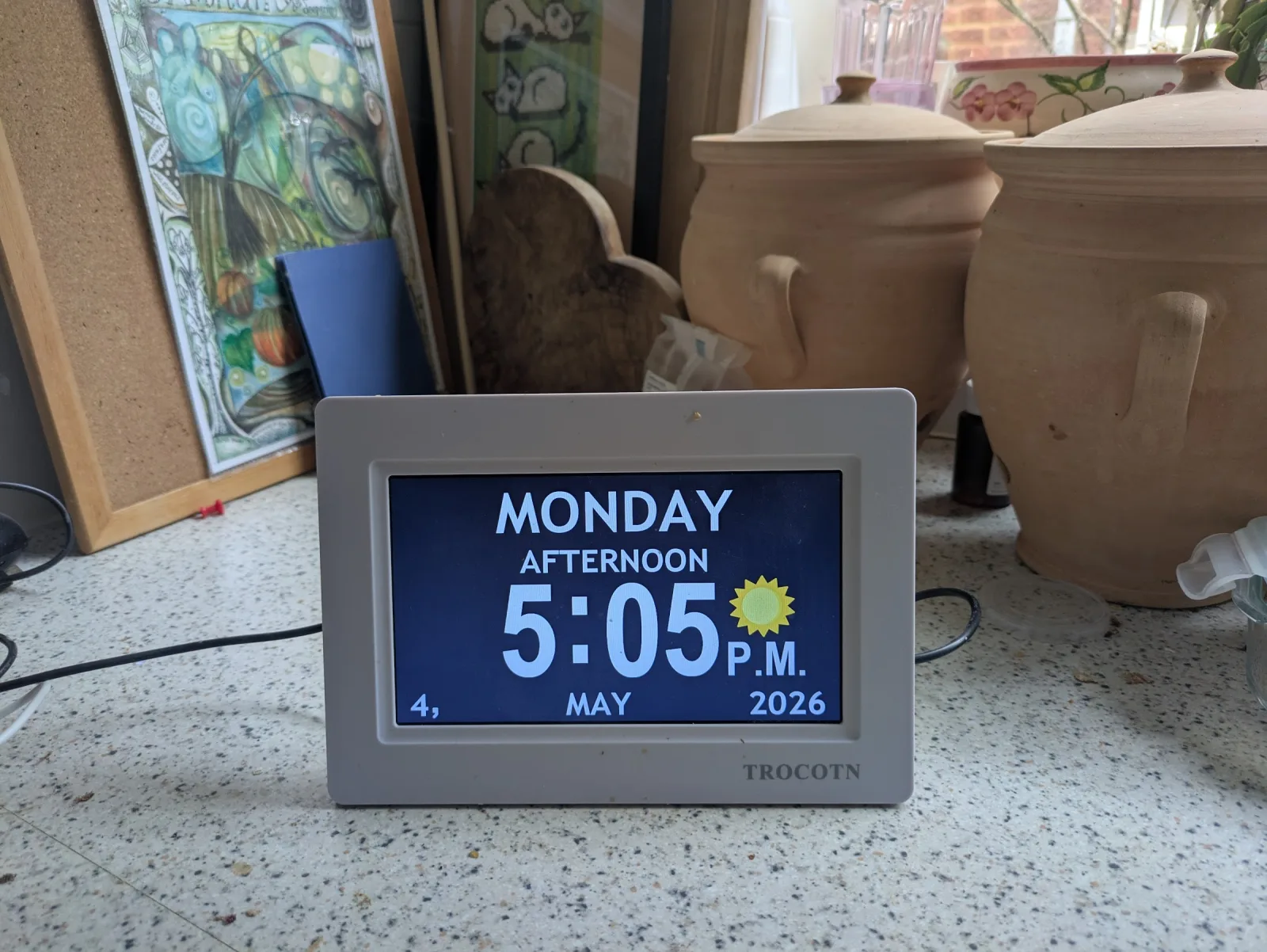
What is a dementia clock?
A dementia clock is a digital clock designed for people with memory loss. It displays the day of the week, time of day, and date in plain language — for example, "Tuesday afternoon, 14 March." Prices range from £30 to £100. They help with orientation but require the user to read a screen, which becomes harder as dementia progresses.
Dementia clock vs day clock
The terms overlap and are often used interchangeably. A day clock is the simpler product: it shows the day of the week and time of day ("Wednesday morning") in clear words, sometimes alongside the date. A dementia clock is the same idea marketed for memory loss, often with a larger display, higher contrast, and clearer typography. Some add scheduled reminder messages — at which point you'll also see them called memory clocks or reminder clocks. In practice, a "dementia clock" is a day clock chosen with dementia in mind; what matters is whether the legibility, format, and (if needed) the reminder feature fit the person you're buying for.
Common UK options include the Rosebud Reminder Clock (£70), DayClox (£100–£150), and the RecallCue app for tablets (£7.99/month).
What dementia clocks and day clocks are good at
A dementia clock (sometimes called a day clock, memory clock or orientation clock) is a digital clock that spells out the day, date, and time of day in plain language — something like "It's Tuesday afternoon, 14 March." The good ones avoid analogue dials and ambiguous AM/PM notation in favour of words. Some add reminder messages at fixed times.
For people in the early to mid stages of dementia, they're genuinely useful:
- They answer the question "what day is it?" at a glance
- They sit on a kitchen counter or bedside table — no setup, no apps, no Wi-Fi
- The pricier models do show simple reminders ("Take morning tablets") at scheduled times
- They cost £30-£100 — affordable, low risk to try
If you haven't tried a dementia reminder clock yet, it's a reasonable starting point. They work for many families.
Where dementia clocks start to fall short
The limitation is built into the format: a clock is a screen, and reading a screen is exactly the skill that dementia chips away at over time.
Three common patterns we hear from families:
- Reading the screen becomes effortful. The words are there, but processing them — translating "Wednesday afternoon" into what does that mean for me right now? — takes more cognitive lift than it used to. Many relatives stop looking at the clock without ever saying so.
- Reminders blend into the wallpaper. A scheduled message at 9am that says "Take tablets" is visible only if your relative happens to be looking at the clock at 9am. There's no audible cue, no nudge.
- Updating reminders requires being there. Most dementia clocks store reminders locally. To add a new one, family has to physically visit and use the device's often-fiddly controls. For long-distance family caring for an older parent, that's a real cost.
When spoken reminders may help
A voice reminder reframes the same problem differently. Instead of asking your relative to read a display, the device tells them — out loud, in a calm voice — when something matters.
Two flavours exist:
- Smart speakers (Alexa, Google Nest, Apple HomePod). Ask them out loud and they answer. Routines can announce reminders at fixed times. They work well for some families, especially in earlier stages.
- Voice reminder buttons. One button, one press. The device speaks the time, day, today's plans, and any reminders the family has added. No wake word, no question to formulate, no menu to navigate.
The button approach trades flexibility for simplicity. You can't ask it the weather. But you also can't get the wake word wrong, and there's nothing to learn.
Want the voice-button version?
RemindMeVoice is the managed voice-button version of this idea: one button, spoken daily reminders, family-managed updates from a phone. Currently in pre-launch — join the list to be notified.
Dementia clock vs Alexa vs voice button — at a glance
A rough guide. There are exceptions to every row.
| Dementia clock | Smart speaker (Alexa, etc.) | Voice reminder button | |
|---|---|---|---|
| How they interact | Look at the screen | Wake word + question | Press one button |
| Works when reading is hard | Limited | Yes | Yes |
| Works without speaking | Yes | No | Yes |
| Family updates remotely | Usually no | Sometimes (via app) | Yes |
| Always-on microphone | No | Yes | No |
| Cost | ~£30-£100 | ~£30-£200 | ~£100+ (managed) or ~£150 (DIY) |
How to choose, by stage
One workable heuristic, knowing every situation is different:
- Early-stage / mild memory problems. A dementia clock or day clock is often enough. It's cheap, easy, and the screen works fine.
- Moderate stage, reading getting harder, comfortable with voice. A voice reminder button or smart speaker tends to land better than a clock — your relative no longer has to actively look and decode.
- Wake-words and "ask Alexa" feel too complex. That's exactly where a one-button voice reminder fits. Press, listen, that's it.
When a reminder device — any reminder device — isn't enough
None of the options above are a substitute for care. A dementia clock, a smart speaker, or a voice reminder button can help with daily orientation and routine support. They are not medical devices, emergency systems, fall detection, wandering protection, or medication safety monitoring.
For those needs, talk to your GP, your local authority's adult social care team, or a dementia charity (Alzheimer's Society and Dementia UK both have advice lines). Reminder technology is one piece of a wider picture — useful, but small in the context of someone's actual care needs.
Where to go from here
If voice-based reminders sound right for your situation, you have two routes:
And — to be clear — if a dementia clock has been working for your relative, there's no urgency to change. Voice reminders are an option for when the clock stops landing. Many families end up running both side-by-side for a while.